This web developer CV template shows a developer progressing from junior agency work to responsibility for client websites and integrations. The Word example covers PHP, WordPress, JavaScript, testing and measurable improvements. The guide explains how to present your technical focus, choose portfolio projects and describe the work behind a reliable, usable website.
Filename: FreeCVDownload_Web_Developer.docx
Content of this CV template
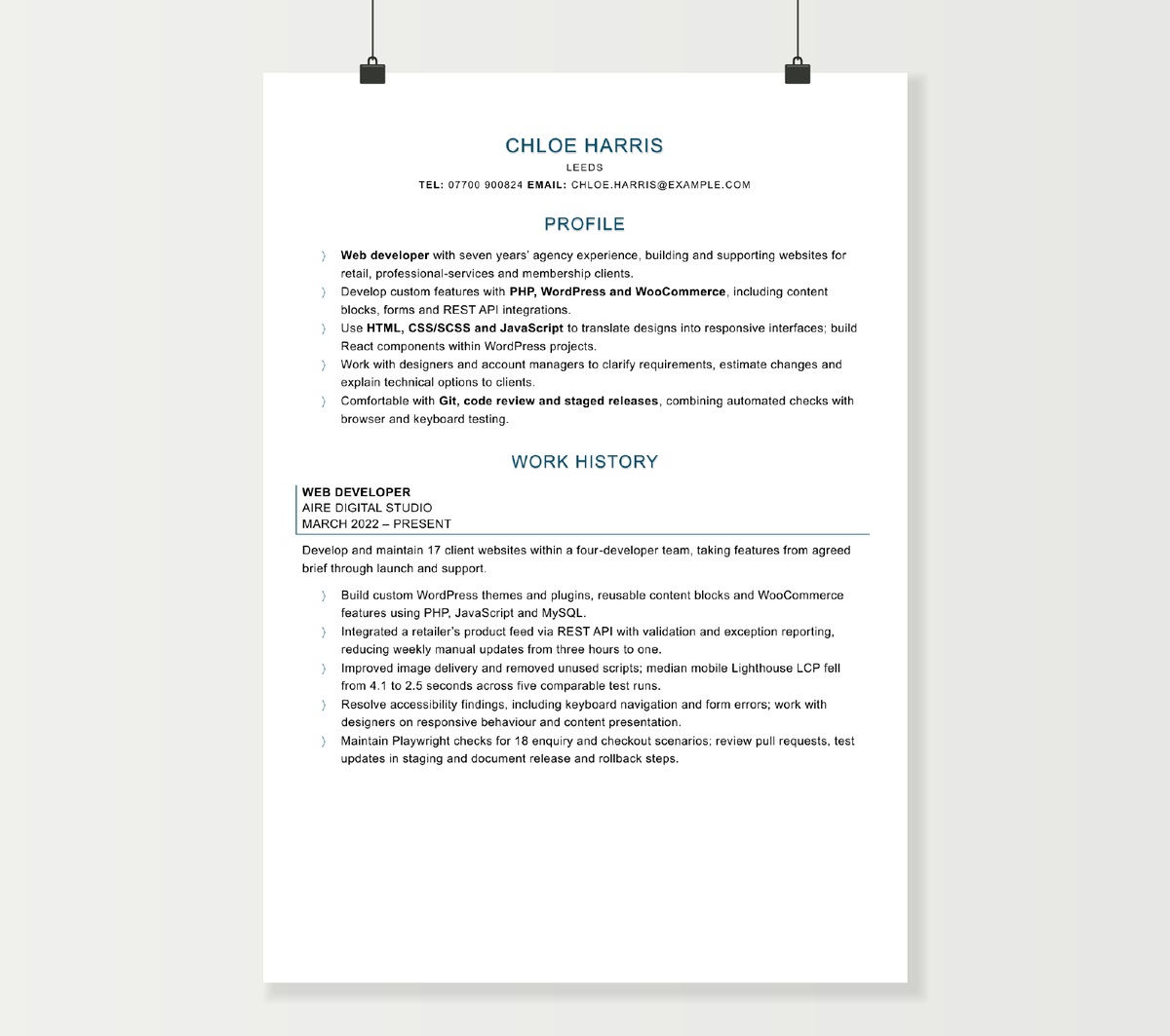
CHLOE HARRIS
LEEDS
tel: 07700 900824 email: [email protected]
PROFILE
- Web developer with seven years’ agency experience, building and supporting websites for retail, professional-services and membership clients.
- Develop custom features with PHP, WordPress and WooCommerce, including content blocks, forms and REST API integrations.
- Use HTML, CSS/SCSS and JavaScript to translate designs into responsive interfaces; build React components within WordPress projects.
- Work with designers and account managers to clarify requirements, estimate changes and explain technical options to clients.
- Comfortable with Git, code review and staged releases, combining automated checks with browser and keyboard testing.
WORK HISTORY
WEB DEVELOPER
AIRE DIGITAL STUDIO
MARCH 2022 – PRESENT
Develop and maintain 17 client websites within a four-developer team, taking features from agreed brief through launch and support.
- Build custom WordPress themes and plugins, reusable content blocks and WooCommerce features using PHP, JavaScript and MySQL.
- Integrated a retailer’s product feed via REST API with validation and exception reporting, reducing weekly manual updates from three hours to one.
- Improved image delivery and removed unused scripts; median mobile Lighthouse LCP fell from 4.1 to 2.5 seconds across five comparable test runs.
- Resolve accessibility findings, including keyboard navigation and form errors; work with designers on responsive behaviour and content presentation.
- Maintain Playwright checks for 18 enquiry and checkout scenarios; review pull requests, test updates in staging and document release and rollback steps.
JUNIOR WEB DEVELOPER
NORTH STREET CREATIVE
JULY 2019 – FEBRUARY 2022
Joined a small digital agency after graduating, supporting senior developers with client builds, maintenance and launch checks.
- Converted approved layouts into HTML and SCSS templates, testing across mobile widths and the team’s supported browsers.
- Implemented WordPress content types and fields, repaired PHP and JavaScript faults and investigated support tickets with clear reproduction steps.
- Built six reusable campaign-page blocks and prepared editor notes, enabling account managers to assemble routine landing pages independently.
- Supported website migrations by checking redirects, forms and analytics events, then resolved issues raised during client acceptance testing.
EDUCATION & DEVELOPMENT
BSc (HONS) COMPUTING — 2:1
LEEDS BECKETT UNIVERSITY – 2019
Final-year project: a responsive event-booking application with a PHP backend, MySQL database and user testing.
REACT COMPONENT DEVELOPMENT
EMPLOYER TRAINING – 2024
CONTINUING DEVELOPMENT
WEB ACCESSIBILITY WORKSHOPS – 2025; PLAYWRIGHT TESTING SESSIONS – 2026
INTERESTS
Cycling, film photography and weekend walks in the Yorkshire Dales.
How to write a web developer CV
A web developer CV should help an employer picture the websites or applications you can work on and the responsibility you can take for them. Your stack matters, but so do the details behind a finished page: how content is managed, what happens when an integration fails, how the interface works on a phone and how changes reach production.
Start with your strongest area, then use a few concrete projects to show it in action. A developer who builds WordPress plugins, a React developer working on a customer portal and a Laravel developer maintaining internal applications will need different evidence near the top of the page.
Make your technical focus easy to understand
Use the profile to establish your level, main environment and type of work. A useful opening could describe agency websites built with PHP and WordPress, commercial front-end work with React and a headless CMS, or internal business applications using Laravel. Add the part of delivery you handle: translating designs, building features, integrating services or maintaining live systems.
A compact skills section can then group the technologies by purpose. Front-end languages and frameworks belong together; CMS or back-end experience can form another group; testing and delivery tools can form a third. This is easier to assess than a continuous string of product names.
Explain the depth through employment bullets. “React components for the WordPress block editor” gives a different picture from “React application with routing, authentication and API-driven forms”. Both are useful skills, and that context helps a reader place them correctly.
Describe the project behind the website
A live URL shows a result, but it rarely shows your contribution. Under each relevant job, choose work that demonstrates different abilities: a new build, a difficult integration, a performance improvement or a feature added to a site with an established audience.
Give the project a short, understandable context before naming the tools. State who used the site, what the change needed to achieve and which part you delivered. Then add the technical decision or challenge and the outcome.
For example, “Built a product-feed integration with validation and exception reporting, reducing the merchandising team’s weekly manual updates from three hours to one” explains far more than “worked with APIs”. It connects implementation with the people who benefited.
For team projects, identify your part in the build. Perhaps you developed the forms and CMS content model while another developer handled hosting and authentication. This gives interviewers a useful starting point and shows how you work within a delivery team.
Show what you built with a CMS
WordPress, Drupal, Shopify, Craft and headless CMS platforms support very different kinds of work. Describe the development rather than relying on the platform name. Custom themes, plugins, blocks, content types, editor workflows, storefront changes and external integrations each demonstrate a particular capability.
Content editing experience can support a development application, especially where it gave you insight into how people maintain a site. Place the emphasis on changes you made to the system: reusable page sections, safer content structures, clearer field layouts or an editor workflow that reduced support requests.
For e-commerce, choose the feature that reveals the complexity you handled. Pricing rules, product imports, fulfilment connections, account-specific catalogues and checkout changes are more informative than the size of the plugin list. Include how you tested the affected customer journey and how the change was supported after launch.
Give front-end quality visible evidence
Responsive development is more persuasive when it goes beyond the phrase “mobile friendly”. Describe a layout or interaction you adapted across devices, the browsers you supported and how you worked with design colleagues to resolve behaviour that was unclear in a static mock-up.
Accessibility deserves the same treatment. Useful CV evidence includes improving keyboard navigation, focus behaviour, form labels and errors, screen-reader announcements or page structure. Name the checks you performed and the findings you resolved. Where you worked against WCAG criteria, include the relevant standard or project requirement and your testing scope.
Automated accessibility checks, manual keyboard testing, assistive-technology checks and specialist audits contribute different evidence. A short description of your actual process gives a technical reviewer more information than a general claim that a site was accessible.
Show collaboration with designers through decisions, not just attendance at meetings. Translating a Figma design into reusable components, agreeing small-screen behaviour or resolving a contrast issue before build demonstrates practical working relationships.
Present performance results with enough context
Performance work can be a strong achievement when the reader can understand the measurement. Identify the page or journey, the change you made and the before-and-after result. Image delivery, unnecessary JavaScript, caching and slow data requests can all provide useful examples.
Say whether the result came from controlled tests or real-user data. A Lighthouse test on a defined mobile profile is different from a field measure across visitors. For a test result, briefly identify comparable conditions or repeated runs; for real-user data, give the period or page group where that helps interpretation.
Business results need similar context. If you implemented a tested checkout change, describe your contribution and the experiment’s result. If the wider team also changed prices, campaigns or content, a direct technical outcome such as fewer form errors or faster page loading may explain your work more clearly than a broad revenue figure.
Include the work that keeps sites dependable
Maintenance is valuable development experience. An employer may need someone who can investigate an unfamiliar codebase, reproduce a browser-specific fault, test a plugin update or trace a failed API request. Show the issue, how you narrowed it down and the lasting improvement.
Testing becomes more credible when you name the behaviour covered. “Added Playwright tests for enquiry submissions and checkout errors” shows more than “automated testing”. Manual regression work, acceptance testing with users and careful defect reports are also useful evidence, particularly for junior roles.
Include the parts of delivery you have used regularly: Git branches and pull requests, code review, staging environments, deployment pipelines, release notes and rollback arrangements. An example of resolving review feedback or making a release safer can demonstrate how you operate in a shared codebase.
Where you handle integrations, mention data validation, authentication, error handling or monitoring when these formed a meaningful part of your work. This helps distinguish a reliable production feature from a demonstration that only covers the successful request.
Connect web work with content and commercial teams
Agency and in-house website roles often involve people whose priorities are content, customer enquiries or sales. Give examples of how you clarified a brief, estimated a change, explained a technical limitation or helped a client choose between options.
Technical SEO and analytics can be useful supporting evidence for these roles. Focus on implementation you owned: redirects during a migration, crawlable templates, canonical handling, structured data, event tracking or a data layer. Keep the result connected to that work rather than turning the CV into a list of marketing channels.
Handover also matters. Documentation, editor training and reusable content blocks can show that you built something colleagues could maintain. A site that reduced routine dependence on developers is a worthwhile outcome even without a large traffic or revenue statistic.
Choose a portfolio that answers technical questions
A small selection of relevant projects is enough when each one adds evidence. Place a portfolio link near your contact details and use short project descriptions in the CV so the application still makes sense before anyone clicks.
A useful project page should help a reviewer understand:
- The purpose of the site or feature and its intended users.
- Your contribution, including any collaboration.
- The stack and the reason it suited the work.
- A technical challenge, decision or improvement.
- How you tested it and what happened after delivery.
Live demos are helpful for interactions; screenshots can show earlier versions; a repository can reveal structure and implementation. For a code sample, a clear README describing the project, setup and important choices makes the work easier to review. Choose the supporting format that best explains the project.
A finished, modest application can provide stronger junior evidence than an ambitious collection of incomplete features. A booking form with validation, useful error states and tests gives you specific development decisions to discuss.
Adjust the evidence to your career stage
For a first role, place substantial projects near the top and describe the work with the same care as employment: requirements, contribution, testing and improvements. Degree, apprenticeship, bootcamp or independent study can explain the route you took. Highlight a relevant final project or practical module rather than reproducing every course topic.
As commercial experience grows, give more space to live systems, support, teamwork and delivery responsibility. Progression may mean taking a feature from brief to release, reviewing others’ changes, estimating work or becoming the technical contact for a client. These are useful signs of development even when your job title has stayed the same.
If the role centres on broader application engineering, compare the emphasis with the software developer CV example. For website-focused applications, keep your strongest web projects, interface quality and ongoing site ownership prominent.
Web Developer CV FAQs
Yes. Commercial work is often held in private repositories. Explain the systems, features and decisions in your CV, and use a portfolio case study or a small independent code sample if it adds useful evidence. A public contribution history is one possible supporting signal; it is not the only way to demonstrate development experience.
Give the dates of your involvement and describe the version or feature you delivered. A dated screenshot, short walkthrough or case study can preserve that context. In the CV, focus on your contribution and result so the evidence remains understandable even if the current site has been redesigned.
Yes. Use a freelance or self-employed heading with dates, then select client projects that match the role. Include scoping, estimates, delivery, testing and ongoing support as well as the build. Grouping small assignments avoids a long list of near-identical entries and makes sustained responsibility easier to see.
Include the strongest ones, particularly where you extended the brief or made decisions of your own. Explain what you added, how you tested it and what you improved after feedback. A project becomes useful evidence when the reader can see your work and reasoning, rather than only the course title or a screenshot.
Show the relevant JavaScript and component work first, with a precise description of where React was used. Add a focused application project if it demonstrates areas the vacancy needs, such as routing, state, API requests or testing. Your existing work with browser behaviour, accessibility, debugging and production delivery can also support the transition.
Include them when they are relevant to the vacancy or to a useful change in your workflow. A brief example of using a tool to investigate a codebase, draft tests or compare approaches is more informative than a product list. Keep the main evidence on the feature delivered, the decisions you made and the review and testing that supported the result.